Version 3 Navigation Preview
Here's a preview of Version 3's new navigation bar.
We've spent quite a bit of time looking at how the navigation within NEXTCOMP.NET can be streamlined and improved. We are still working out all the new navigation features. We're far enough along that we wanted to share some images from Version 3. The final navigation bar will most likely vary from this preview.
This is the Start Page running in the Firefox browser.
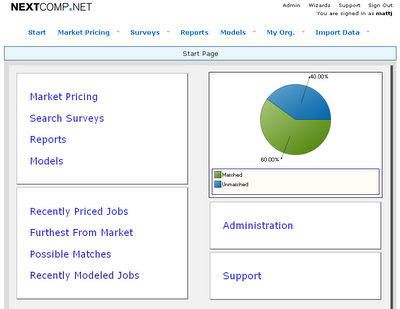
You can see that we've re-arranged the Start Page and changed the navigation bar at the top of the page.
The first button will always take you back to the Start Page.
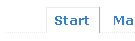
The next button takes you to the Market Pricing page, where you can view your jobs, matches and projects.
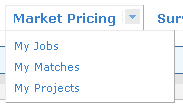 A project is a new concept in Version 3. It allows you to group jobs together from one or more pay plans. For instance, if you are market pricing a group of IT jobs, you could add them to an "IT 2008" project. This allows you to view all the relevant jobs together without the hassle of searching and selecting indivual jobs from a list of all jobs.
The next button, Surveys, give you access to the tools for managing your survey library. We have a new way of managing surveys in Version 3. More on that topic in a future blog post.
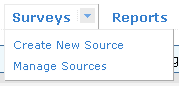
The next button takes you to the Standard and Custom Query reports.

The reports will have a similar functionality as the current version. We do have some nice enhancements planned though, such as being able to add formulas to Custom Queries so that all of your analysis can be accomplished within NEXTCOMP.NET, rather than having to use Excel for parts of the analysis.
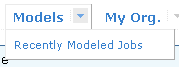
The next button allows you to manage your compensation models and you can quickly see a list of recently model jobs.
The next button gives you access to all of your organization's data.
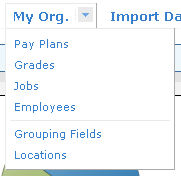 Grouping fields, such as Job Group or Department play a larger role in reporting and analysis in Version 3, so this data type has it's own link. Locations have an expanded role as well. Version 3 will be able to automatically geographically factor data based on location, using geographic factors that you supply.
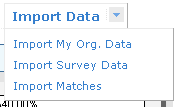
And finally, all of the tools you'll need to import data are located on the right of the navigation bar.
We've spent quite a bit of time looking at how the navigation within NEXTCOMP.NET can be streamlined and improved. We are still working out all the new navigation features. We're far enough along that we wanted to share some images from Version 3. The final navigation bar will most likely vary from this preview.
This is the Start Page running in the Firefox browser.

You can see that we've re-arranged the Start Page and changed the navigation bar at the top of the page.
The first button will always take you back to the Start Page.

The next button takes you to the Market Pricing page, where you can view your jobs, matches and projects.
 A project is a new concept in Version 3. It allows you to group jobs together from one or more pay plans. For instance, if you are market pricing a group of IT jobs, you could add them to an "IT 2008" project. This allows you to view all the relevant jobs together without the hassle of searching and selecting indivual jobs from a list of all jobs.
The next button, Surveys, give you access to the tools for managing your survey library. We have a new way of managing surveys in Version 3. More on that topic in a future blog post.

The next button takes you to the Standard and Custom Query reports.

The reports will have a similar functionality as the current version. We do have some nice enhancements planned though, such as being able to add formulas to Custom Queries so that all of your analysis can be accomplished within NEXTCOMP.NET, rather than having to use Excel for parts of the analysis.
The next button allows you to manage your compensation models and you can quickly see a list of recently model jobs.

The next button gives you access to all of your organization's data.
 Grouping fields, such as Job Group or Department play a larger role in reporting and analysis in Version 3, so this data type has it's own link. Locations have an expanded role as well. Version 3 will be able to automatically geographically factor data based on location, using geographic factors that you supply.
And finally, all of the tools you'll need to import data are located on the right of the navigation bar.

posted by Matt Johnson at
12:09 AM
|
0 comments


